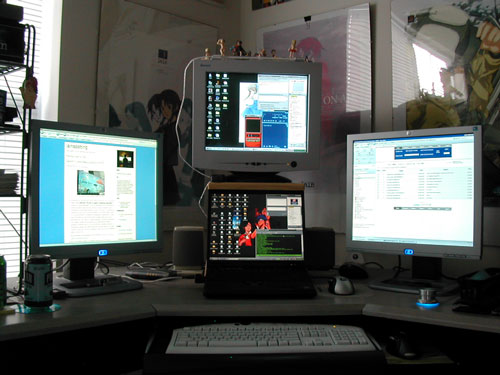
When people see my computer/monitor setup, they often ask me "Why do you need so many monitors? What do you use them for?" It's a legitimate question, and one that I'll try to answer here.
Ultimately, I like to have a lot of different things open at once, and to accomodate that, I need a lot of screen real estate. One way to do that would be to buy a huge monitor running at a high resolution. Since I don't have thousands of dollars just waiting to be spent, a cheaper solution was to set up multiple monitors attached to a couple of computers running simultaneously.
My setup
That's right, not all of those monitors are associated with one computer. My primary computer is my IBM Thinkpad laptop, and I have a 19 inch LCD monitor attached to it on the left side as the secondary monitor. My other computer (which is hidden away below) is a Dell desktop I bought back in 1999 or so. Back then, it was top of the line. These days, it serves as a nice secondary unit. The CRT above my laptop serves as the primary monitor for the Dell, and I have another 19 inch LCD to the right of my laptop which serves as the Dell's secondary monitor.
Running 4 displays with the following resolutions gives me a ton of pixels to work with:
Thinkpad display: 1400 x 1048
HP LCD: 1280 x 1024
HP LCD: 1280 x 1024
Envision CRT: 1024 x 768
All added up, that's 4,875,072 pixels, and everything is nicely sized (text is not too big, and not too small). I used to have a third monitor attached to my Dell (for a total of 5 displays), but I decided that 4 total displays is enough for my needs (for now).
How I use it all
With my Thinkpad, I access my primary email and I chat with my college friends via a shell account that is constantly open on my primary monitor. I also use IM on the Thinkpad to do
research-related IM. On my secondary monitor, I have Opera open pretty much constantly, which I use to do all my web browsing/research, and believe me when I say that I do a lot of it (thank god for tabbed browsing). Most of my content creation happens on the Thinkpad, as well. When I want to update my website, I just hit ctrl-F3 in Opera to view the source in my text editor of choice, and I start making changes. Image editing for the web, scanning with my CanoScan N1240U, getting images from my Nikon digital camera, uploading music onto my Creative Muvo N200 MP3 player, writing documents, updating this blog, etc. is all done on my Thinkpad. Since my Thinkpad is the more powerful computer, I also use it to watch anime.
I use my Dell for stuff that happens in the background. For example, I use it to play my music: MP3s using Winamp, and CDs using the serial experiments lain CD player (see
http://www.geneon-ent.co.jp/rondorobe/game/frame_lain.html). I also use it to IM my friends. This all happens on the primary monitor--the CRT above the Thinkpad. On my larger LCD screen, I once again have a copy of Opera constantly open. On this copy of Opera, I generally have at least 4 tabs open at any given time:
1. My university webmail account
2. My incoming mail from my Gmail account. For this, I use Gmail's POP functionality and M2--Opera's internal mail reader (which is truly excellent, by the way)
3. My website stats tracker
4. Miscellaneous IRC, whether it's for research or to chat with other Opera users about brower customization, etc.
I also keep my Opera mail panel open because I also use M2 to read my various newsfeeds (I have 13 at the moment). Whenever a feed gets updated, Opera shows which articles I haven't read yet. Opera's RSS reader also displays full articles, which is a really nice feature. For example, I can read slashdot without ever actually going to the slashdot website (unless I want to view comments, of course).
Finally, I use my Dell to watch DVDs (on the CRT).
Other accessories to make my life easier
You'll notice my Altec Lansing ADA880's to the left and right of my Thinkpad. I got these surround speakers when I got the Dell, and although they're old, they still do the job. They were one of the first computer speakers to include a built-in Dolby Digital decoder. They play sound from both my Thinkpad (analog signal) and the Dell (digital signal), and they sound really amazing when playing DVDs that have Dolby Digital encoding. The analog signal from my Dell gets piped to my Pioneer HDJ-1000 headphones, which I use late at night so as not wake up my wife. Audio-in from my old Walkman lets me play cassette tapes and listen to the radio.
For the Thinkpad, I routinely use the Trackpoint button on the keyboard, but I also use a Logitech MX700 wireless optical mouse on a 3M Precise Mousing Surface, which actually does seem to make a difference.
For my Dell, I use a Logitech MX1000 wireless laser mouse on an anime-related mousepad.
The glowing blue knob at the right is my Griffin Powermate. Yes, it's a glorified volume controller, but it's really nice (I like nice metal things).
On top of my CRT, I have a USB-powered Antec external light tube. I can choose between half a dozen colors. I'm not into case-modding or installing glowing lights everywhere, but I often use my computers with the lights off, and having a little extra ambient light can be soothing (especially when it's glowing green or blue to offset the brightness coming from my monitors).
I use a port replicator with my Thinkpad. That allows me to quickly dock and undock the laptop without having to mess around with the cables in the back.
My keyboard mod
As I was writing this, my slashdot feed updated, and I ran across an
article about a new
blank keyboard that is now being sold. It reminded me to take a picture of my Thinkpad's keyboard. After heavy usage, the letters on many of my keys started to come off, so I decided to go for broke and get rid of all the letters. My solution was simple; I just used sandpaper. The overall visual and tactile effect is nice, and I am a better typist now, as well. Here's the photo:

By the way, if you came to this page looking for info on how to get your Thinkpad trackpoint button working with Opera, visit this Opera
forum link for more information.
 On Thursday night, I spoke on a panel presentation called "Fanatics, Cuties & Geeks: The Otaku Phenomenon & its Impact Abroad" at Japan Society, also in New York City. This time, I spoke very briefly (and quickly), summarizing my thoughts on otaku culture. Other panelists presented as well, and we had a lively Q&A session with the audience members.

 I'm pretty picky when it comes to technology, and friends of mine know that I'm a fan of the
 They're kind of like
 The Apple Computer company is really interesting. Even though I don't own a Mac (not yet, anyway), I like reading about the company and watching Steve Jobs present keynote addresses at Mac events. Opera excites me in the same way. These aren't as glitzy as Steve Jobs keynote addresses, but here are some audio and video clips of Opera's CEO, Jon S. von Tetzchner (pictured right), and other members of the Opera team discussing the company and the Opera browser. People who are new to Opera and veteran Opera fans alike will learn a lot about the company from these clips.